

Get these ready.
- Access to your own Binance account and its security verification methods.
- API access enabled for your account under the exchange's current requirements.
- Access to Exchange Connections in your trading workspace. Plan limits and payment approval can affect access.
Exchange menus and account requirements can change. This guide explains the workflow; the official references below provide the exchange's current requirements.
Open Binance API Management
Sign in on the official Binance website. Under your account settings, find API Management. Follow the exchange's current identity and security checks before creating a key.
Exchange reference ↗Create a system-generated key
Choose the system-generated API option for an API key and secret compatible with this connection form. Use a recognizable label, such as your workspace name, and complete the verification prompts. This form does not accept an RSA or Ed25519 private key.
Exchange reference ↗Restrict access to the workspace server IP
In your workspace, open Exchange Connections and locate the server IP shown in the connection instructions. Copy the current value into the key's trusted-IP restrictions on Binance, then save. Use the IP displayed in your account, rather than a value copied from an old screenshot.
Review trading permissions
Enable reading and only the trading access required for your intended market. Keep withdrawals off. Check that the final saved permissions match your intended use; the exchange may group permissions under a combined label.
Add the keys in Exchange Connections
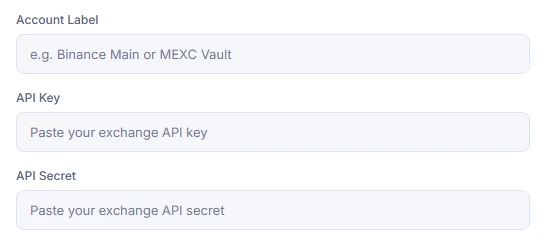
Open Connect your exchange in your workspace and select Binance Global. Enter an Account Label, paste the API Key and API Secret into their matching fields, then submit the connection form. Paste credentials only in your signed-in connection form, never into a support message or shared document.
Check the connection before starting a bot
Read the success or error message and confirm that the account appears under Connected exchanges. Review the balance and the market you intend to use. Connecting an account does not, by itself, start a trading bot. For practice, use the platform's paper environment rather than assuming live exchange keys are testnet keys.
Check the likely cause.
Invalid API key, IP or permissions
Check for extra spaces, confirm the trusted IP against the current dashboard value and recheck saved permissions. If a key was replaced or deleted, update the connection with the new key.
Futures permission is unavailable
Check futures account activation and key eligibility with Binance. Its API guide explains that a key created before futures activation or certain account configurations can prevent futures permission. Do not assume a successful spot connection authorizes futures orders.
Exchange reference ↗The workspace will not add another exchange
Review your subscription's exchange-account limit and check whether that exchange is already connected. A pending manual payment may also keep workspace tools unavailable until approval.
Official exchange references
Use the exchange's own instructions to confirm changes to menus, permissions and eligibility.
Binance is an independent exchange. This guide does not imply an official partnership or endorsement.Connect from your workspace.
Review the permissions and connection result before enabling any live strategy.
API keys can authorize trades. Keep secrets private and withdrawals disabled. Trading can cause losses; read the Risk Disclosure before using live funds.