

Choose the market before the bot.
Choose according to your understanding of the market and risk, rather than an assumed return. Availability depends on your account, plan, selected pair and exchange permissions.
Spot Auto-Harvest
A spot grid workflow places staggered limit buys and prepares corresponding target sells after fills. Monitor unsold holdings as well as completed trades: a falling asset price can offset realized gains, and open orders may not fill.
Explore the spot strategy →Quant 10x Scalper
A futures workflow evaluates market trend and momentum for position management. Review the actual leverage, allocation and exit settings before deployment. Leverage amplifies losses as well as gains, and futures positions can be liquidated.
Explore the futures strategy →Prepare the right Binance API permissions
Use a supported system-generated API key and restrict it to the current workspace server IP shown in Exchange Connections. Enable only the permissions required by your chosen market. Futures account access and key permissions must be checked separately from spot balance access. This connection is for Binance Global; do not assume Binance.US compatibility.
Exchange requirements can change. Confirm them in the Binance API key creation guide and the workspace connection guide.
From account to your first setup.
- Review access. Compare plans and the limits relevant to your setup. Pending manual payments require approval before paid access is enabled.
- Practice first. Use the paper environment to understand the controls. Simulated results do not establish live execution performance.
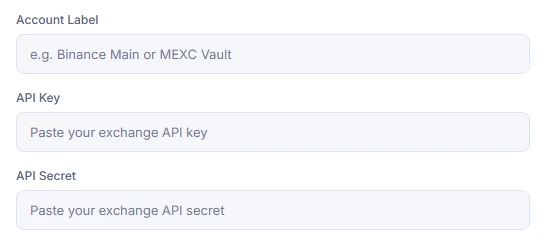
- Connect for live trading. Select Binance Global in Exchange Connections, add a dedicated API key and check the saved permissions. Keep withdrawals disabled.
- Review Create Bot. Choose a supported strategy and pair, check the environment and allocation, then confirm when you understand the settings.
- Check the result. Monitor bot status, open orders and execution errors. A successful connection is not a completed trade.
Follow the full execution picture.
Bot Portfolio shows status and capital allocation. The dashboard provides holdings or position information, while order history helps you inspect executions. Compare realized and floating performance, then review exchange fees and any futures funding costs rather than relying on a headline profit figure alone.
The subscription pays for platform access; trading capital remains separate. Review current plans and limits, API security and the Risk Disclosure before using live funds.
Before you connect Binance.
Is this the same as a native Binance trading bot?
No. KAAPA EXPERT is a separate workspace operated by CEXBoost LLC. It sends authorized trading instructions through your exchange API connection rather than operating as a Binance product.
Can I use a Binance spot bot without futures leverage?
Spot Auto-Harvest is the spot grid strategy. Quant 10x Scalper is the separate futures strategy. Review the selected strategy and trading environment before confirming Create Bot.
Why are Binance trading permissions unavailable?
Recheck trusted IP restrictions and the account requirements shown by Binance. Futures eligibility and key permissions can differ from spot access. Follow the exchange guidance rather than bypassing security restrictions.
Are profits or a specific win rate guaranteed?
No. Automation follows an execution workflow, not a guaranteed outcome. Markets, liquidity, fees, API errors and outages can all affect results. You can lose trading capital.
Do I need to transfer trading funds to KAAPA EXPERT?
Live trading funds remain in your connected exchange account. Subscription payment is separate. Restrict API permissions and keep withdrawals disabled; trading permissions still authorize trades and can expose your account to losses.
Start with the Binance setup guide.
Review the API steps and troubleshooting before enabling live execution.